
Kairon
  • Kairon 4.24
  • About Us
  • Contact
  • English
  • Click to open the search input field Click to open the search input field Search
  • Menu Menu
  • Link to Facebook
Basics, Manuals

Selecting Objects in Kairon 4

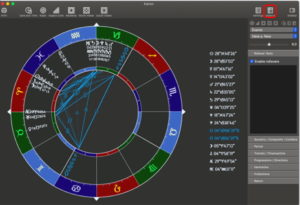
If you are like me, you will have your own set of ‘pet objects’ which you like to see in a chart, or maybe you have heard about one which you would like to try. Selecting objects in Kairon 4 is very easy.
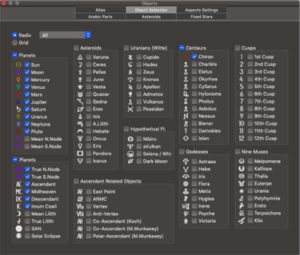
The object selection screen is very large and quite comprehensive. My selections for regular reading are shown, yours will probably be different.
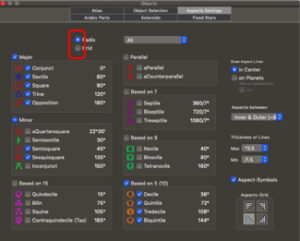
While we are in the objects menu I will set up aspects. Now this window will only tell you which aspects to display, it will not allow the setting of orbs etcetera, that we will do when we get back to the ‘settings’ screen.

Colours can be set here by clicking on the aspect then selecting the colour you want from the colour picker.

However, do remember to select both the Radix and the Grid for visible aspects. Some people may like to see different sets in the Radix and the Grid, this gives you that option.
While I am still selecting objects I had better select my favourite Arabic Parts. 

First you must find your part in the main column (or create it but that is for another discussion). Then it can be added by the ‘add selected item’ button, at which time it appears both on the list to the left, and on the drop down menu from which it can be deleted if required.
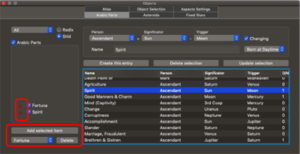
As you can see Arabic Parts come up with a generic ‘placeholder’ which I will replace with glyphs when I get back to the ‘Settings’ screen, but for now I have just selected them, (like I have selected aspects without doing anything to them). 

Colours again can be changed here by clicking on the ‘added’ item. The colour will apply to the glyph when that is changed as well.

Again make them visible in the Radix and Grid if that is what you want.

I will proceed to show you how to change glyphs, but if you are impatient then it has already been talked about when discussing astroids here: https://kairon.at/Kairon4/en/custom-symbols/

March 25, 2020/0 Comments/by Rodney Smith
Tags: Basics
https://kairon.at/Kairon4/wp-content/uploads/2024/06/LogoKairon4_text-2-300x138.png 0 0 Rodney Smith https://kairon.at/Kairon4/wp-content/uploads/2024/06/LogoKairon4_text-2-300x138.png Rodney Smith2020-03-25 06:07:492020-03-26 05:02:33Selecting Objects in Kairon 4
You might also like
Colours: The last of the ‘set up’ help files.
Kairon 4 from the beginning
About those Aspects
Back to the Settings Menu
Basics of data entry
First settings
0 replies

Leave a Reply

Want to join the discussion?
Feel free to contribute!

Leave a Reply Cancel reply

Your email address will not be published. Required fields are marked *

Tutorials

  • Videotutorials
  • Data Structure
  • Data Import
  • Backup
  • Kairon 4 from the beginning
  • Basics of data entry
  • First settings
  • Selecting Objects in Kairon 4
  • About those Aspects
  • Colours: The last of the ‘set up’ help files.
  • Back to the Settings Menu
  • Custom Symbols
  • Synastries
  • Asteroids
  • Midpoint-Trees
  • Helptexts and Interpretations
  • AI Interpretation

Company

Mag. Kilian Sternad
Hochstraße 11/14
1230 Wien

Legal

  • GDPR
  • Imprint
  • Contact

Archive

  • February 2026 (1)
  • November 2024 (1)
  • August 2023 (1)
  • April 2020 (1)
  • March 2020 (9)
  • January 2020 (3)
  • December 2019 (1)

Language

  • English
  • Deutsch
© Kairon K.S.
  • Link to Facebook
  • GDPR
  • Imprint
  • Contact
Link to: Kairon 4 from the beginning Link to: Kairon 4 from the beginning Kairon 4 from the beginning Link to: Asteroids Link to: Asteroids Asteroids
Scroll to top Scroll to top Scroll to top

Diese Seite verwendet Cookies. Mit der Weiternutzung der Seite, stimmst du die Verwendung von Cookies zu.

Einstellungen akzeptierenVerberge nur die BenachrichtigungEinstellungen

Cookie and Privacy Settings


How we use cookies

We may request cookies to be set on your device. We use cookies to let us know when you visit our websites, how you interact with us, to enrich your user experience, and to customize your relationship with our website.

Click on the different category headings to find out more. You can also change some of your preferences. Note that blocking some types of cookies may impact your experience on our websites and the services we are able to offer.

Essential Website Cookies

These cookies are strictly necessary to provide you with services available through our website and to use some of its features.

Because these cookies are strictly necessary to deliver the website, refusing them will have impact how our site functions. You always can block or delete cookies by changing your browser settings and force blocking all cookies on this website. But this will always prompt you to accept/refuse cookies when revisiting our site.

We fully respect if you want to refuse cookies but to avoid asking you again and again kindly allow us to store a cookie for that. You are free to opt out any time or opt in for other cookies to get a better experience. If you refuse cookies we will remove all set cookies in our domain.

We provide you with a list of stored cookies on your computer in our domain so you can check what we stored. Due to security reasons we are not able to show or modify cookies from other domains. You can check these in your browser security settings.

Other external services

We also use different external services like Google Webfonts, Google Maps, and external Video providers. Since these providers may collect personal data like your IP address we allow you to block them here. Please be aware that this might heavily reduce the functionality and appearance of our site. Changes will take effect once you reload the page.

Google Webfont Settings:

Google Map Settings:

Google reCaptcha Settings:

Vimeo and Youtube video embeds:

Einstellungen akzeptierenVerberge nur die Benachrichtigung