
Kairon
  • Kairon 4.24
  • About Us
  • Contact
  • English
    • Deutsch
  • Click to open the search input field Click to open the search input field Search
  • Menu Menu
  • Link to Facebook
Basics, Manuals

Basics of data entry

The next logical step is to input basic birth data. I will use Buddy Holly as my example, but this will work for anyone.
This chart is
September 7, 1936, 3:30 pm (or 15:30 if you prefer) in Lubbock TX
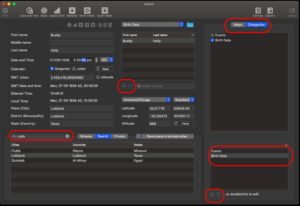
1. Select “Categories” in the top right of the screen.

2. Select “+” at the very bottom of that screen then double click on the strip which emerges. I named this category “Birth Data”

3. Select “+” in the middle of your screen. This will allow you to input data.

4. Enter first and last names in their fields

5. Date is recorded in DD/MM/YYYY format and time is recorded in am/pm format. Each section of the “Date and Time” window is highlighted in turn.

6. Enter the town “Lubbock” in the search field for the atlas and click on the correct entry when you see it.
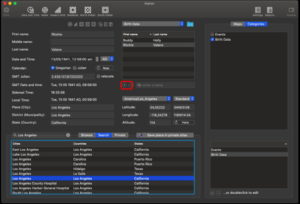
The data for Ritchie Valens was entered in the “Birth Data” category simply by selecting the “+” symbol then entering the data as above. 

May 13, 1941,12:56 am, Los Angeles, California.

Categories is new in Kairon 4, but allows you to group like charts together.

The “Category” in Kairon4 operates like the “file name” in Kairon 3 and multiple charts can be saved in the familiar Kairon 3 format using the “export AAF” option from the file menu.
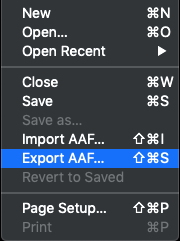
There are other exports which are possible in Kairon 4, but this one is important because it allows you to keep track of your data.

March 22, 2020/0 Comments/by Rodney Smith
Tags: Basics
https://kairon.at/Kairon4/wp-content/uploads/2024/06/LogoKairon4_text-2-300x138.png 0 0 Rodney Smith https://kairon.at/Kairon4/wp-content/uploads/2024/06/LogoKairon4_text-2-300x138.png Rodney Smith2020-03-22 11:44:492020-03-22 22:00:08Basics of data entry
You might also like
Kairon 4 from the beginning
First settings
About those Aspects
Colours: The last of the ‘set up’ help files.
Back to the Settings Menu
Selecting Objects in Kairon 4
0 replies

Leave a Reply

Want to join the discussion?
Feel free to contribute!

Leave a Reply Cancel reply

Your email address will not be published. Required fields are marked *

Tutorials

  • Videotutorials
  • Data Structure
  • Data Import
  • Backup
  • Kairon 4 from the beginning
  • Basics of data entry
  • First settings
  • Selecting Objects in Kairon 4
  • About those Aspects
  • Colours: The last of the ‘set up’ help files.
  • Back to the Settings Menu
  • Custom Symbols
  • Synastries
  • Asteroids
  • Midpoint-Trees
  • Helptexts and Interpretations
  • AI Interpretation

Company

Mag. Kilian Sternad
Hochstraße 11/14
1230 Wien

Legal

  • GDPR
  • Imprint
  • Contact

Archive

  • February 2026 (1)
  • November 2024 (1)
  • August 2023 (1)
  • April 2020 (1)
  • March 2020 (9)
  • January 2020 (3)
  • December 2019 (1)

Language

  • English
  • Deutsch
© Kairon K.S.
  • Link to Facebook
  • GDPR
  • Imprint
  • Contact
Link to: Custom Symbols Link to: Custom Symbols Custom Symbols Link to: First settings Link to: First settings First settings
Scroll to top Scroll to top Scroll to top

Diese Seite verwendet Cookies. Mit der Weiternutzung der Seite, stimmst du die Verwendung von Cookies zu.

Einstellungen akzeptierenVerberge nur die BenachrichtigungEinstellungen

Cookie and Privacy Settings


How we use cookies

We may request cookies to be set on your device. We use cookies to let us know when you visit our websites, how you interact with us, to enrich your user experience, and to customize your relationship with our website.

Click on the different category headings to find out more. You can also change some of your preferences. Note that blocking some types of cookies may impact your experience on our websites and the services we are able to offer.

Essential Website Cookies

These cookies are strictly necessary to provide you with services available through our website and to use some of its features.

Because these cookies are strictly necessary to deliver the website, refusing them will have impact how our site functions. You always can block or delete cookies by changing your browser settings and force blocking all cookies on this website. But this will always prompt you to accept/refuse cookies when revisiting our site.

We fully respect if you want to refuse cookies but to avoid asking you again and again kindly allow us to store a cookie for that. You are free to opt out any time or opt in for other cookies to get a better experience. If you refuse cookies we will remove all set cookies in our domain.

We provide you with a list of stored cookies on your computer in our domain so you can check what we stored. Due to security reasons we are not able to show or modify cookies from other domains. You can check these in your browser security settings.

Other external services

We also use different external services like Google Webfonts, Google Maps, and external Video providers. Since these providers may collect personal data like your IP address we allow you to block them here. Please be aware that this might heavily reduce the functionality and appearance of our site. Changes will take effect once you reload the page.

Google Webfont Settings:

Google Map Settings:

Google reCaptcha Settings:

Vimeo and Youtube video embeds:

Einstellungen akzeptierenVerberge nur die Benachrichtigung