
Kairon
  • Kairon 4.24
  • About Us
  • Contact
  • English
    • Deutsch
  • Click to open the search input field Click to open the search input field Search
  • Menu Menu
  • Link to Facebook
Nicht kategorisiert

AI Interpretation

Since version 4.24, Kairon includes an integrated AI tutor that not only interprets horoscopes, but can also be an excellent astrology teacher—provided we ask the right questions and keep a watchful eye on its reasoning.

In the Text section under Text Generator, Kairon now provides a new button labeled [AI Prompt], which supports two different operating modes depending on your preference.
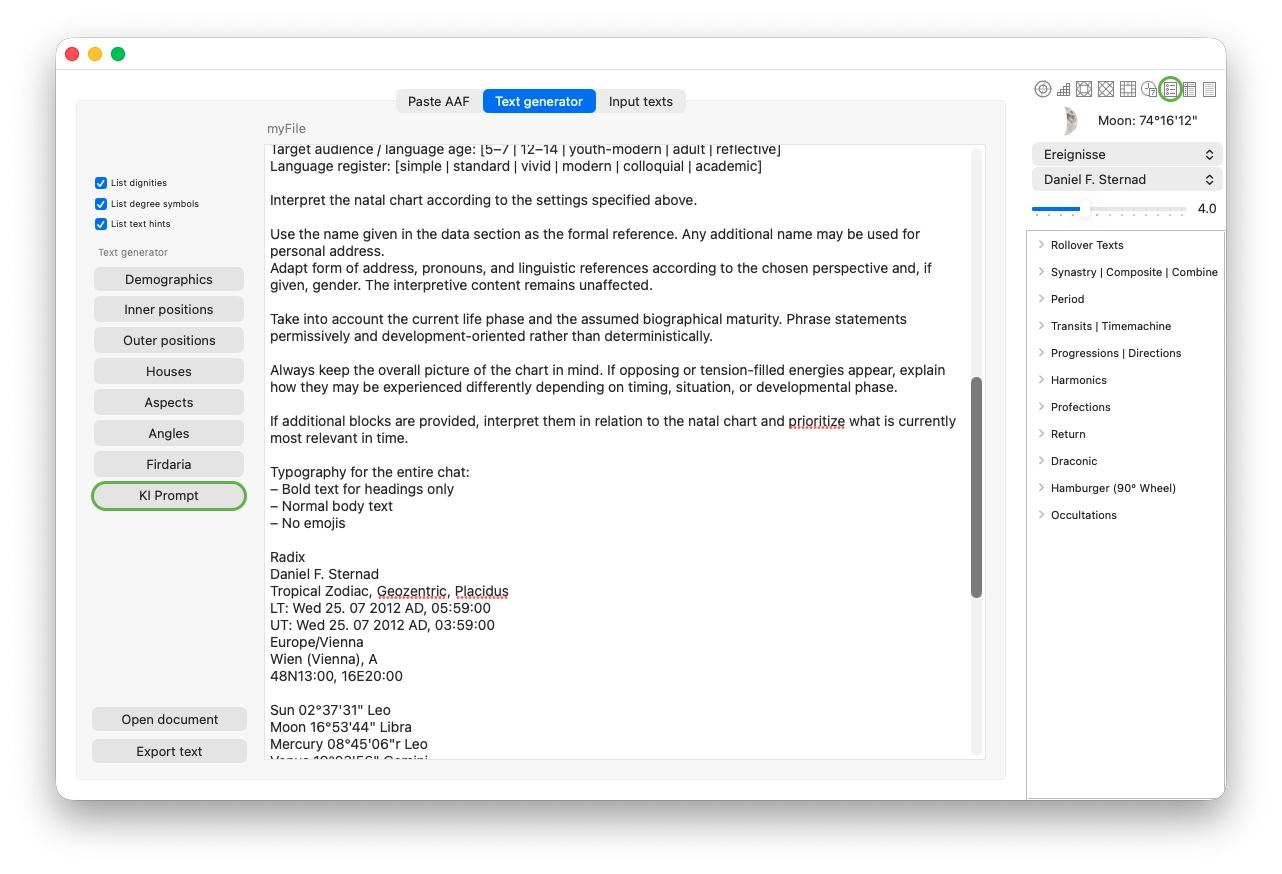
Textgenerator of Kairon

Without making any further settings, the button operates in Prompt-Only mode.

In this mode, a text block is generated that can be pasted into any chatbot, such as ChatGPT, Claude, Gemini, Copilot, or others. These systems will then produce an interpretation of the data—completely free of charge. You can then refine this interpretation, ask follow-up questions, edit it, and use it as a foundation for a client consultation.

A simple instruction such as “Write for a 12-year-old boy” fundamentally changes the output, and it is highly recommended to experiment extensively with different instructions.

Clicking [AI Prompt] (outlined in green here) returns the current data you last worked with. This means that if transits are still active, they will automatically be included in the prompt, and the AI will take them into account in its interpretation.

You can then ask follow-up questions based on the returned interpretation, request deeper exploration of specific topics, and continue refining the discussion. It is like having a conversation with an experienced astrologer—except it costs nothing, requires no appointment, and allows you to take as much time as you wish. If you are using a service with a login, your session will be saved, and you can resume the discussion at any time simply by opening the same link again.

Editing and saving your prompt

You will quickly want to create your own prompt as a starting template, which you can then adjust slightly depending on the horoscope you are working with.

To do this, click the second green-outlined button in the upper right and switch to the AI tab, as shown:
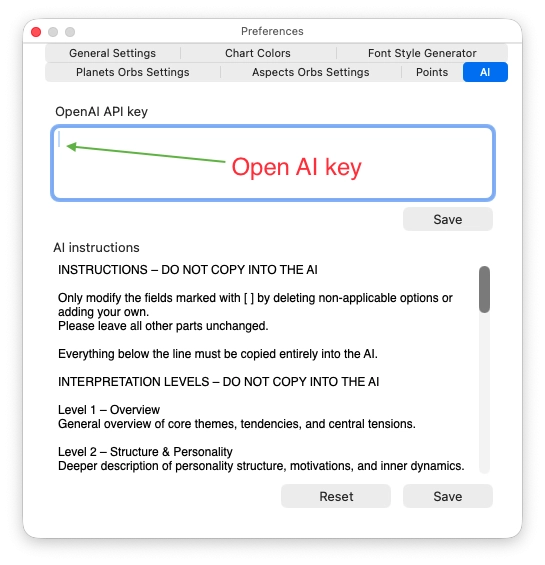
Ai preferences of Kairon

In the lower field labeled AI Instruction, you can save and edit your preferred prompt text. Do not forget to confirm your changes by clicking [Save] below the text field, otherwise your changes will be lost.

If you are unsure, you can click [Reset] at any time to return to the original version. This restores the default prompt provided by me—not your most recently saved version.

Once configured, everything becomes much faster, since you will rarely need to modify the prompt settings again.

Direct AI mode (optional)

There is also a second operating mode available.

To enable it, you must enter your personal API key in the upper field. However, this is not necessary if you only want to generate and edit prompts. The prompt-only mode works automatically without your own key.

When you enter an API key, Kairon can access the AI directly. This is explained in the next section.

Activating the chatbot inside Kairon

Kairon includes an integrated chatbot that allows you to stay within Kairon and save interpretations and conversations directly as formatted text, which can then be opened and edited in standard text editors.

To use this feature, you must enter your personal OpenAI API key in the upper dialog field. Once the key is present, clicking [AI Prompt] will automatically open a dedicated chat window, as the button switches to its second mode:
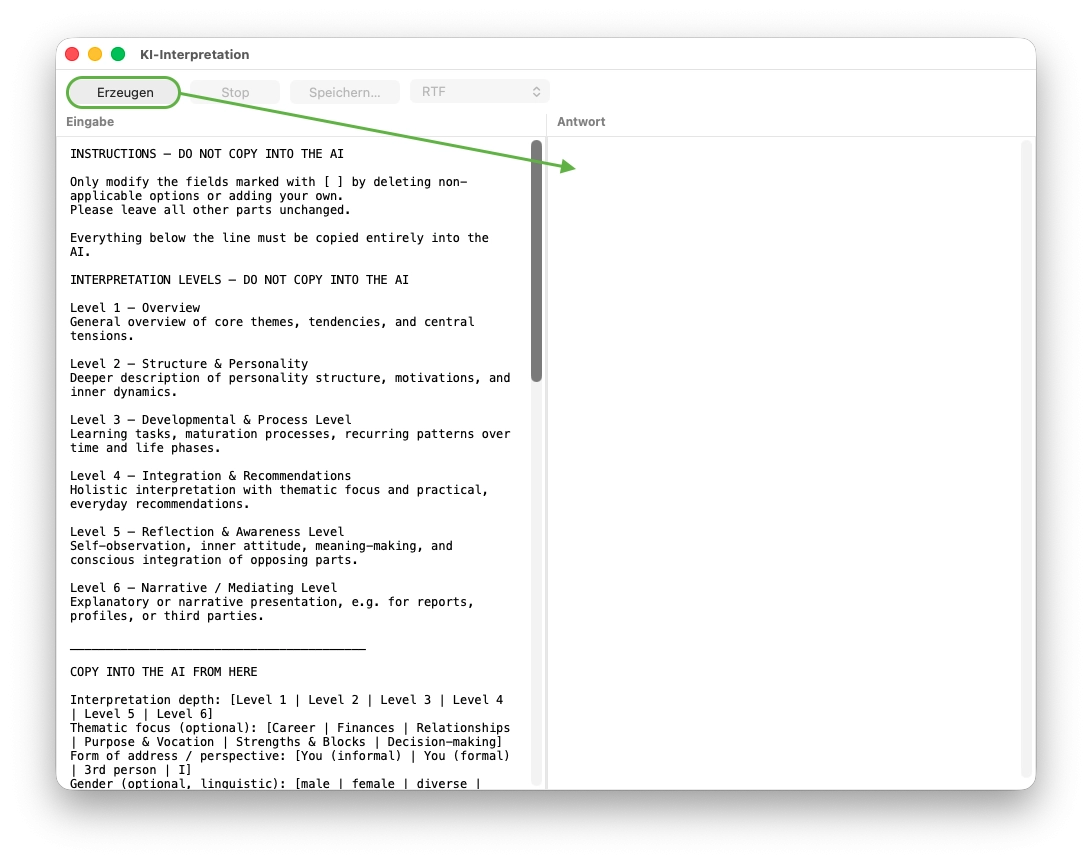
Chat window of Kairon

The advantage of this chat window is that you no longer need to leave Kairon. You can watch the interpretation being generated live, without delays, and easily save the complete text afterward—regardless of its length.

How to obtain an OpenAI API key

Open the website:

https://platform.openai.com

Sign in or create a new account.

Then select Billing from the navigation menu on the left and add a payment method.

It is not necessary to preload credit. Billing is usage-based and typically amounts to about 3 to 5 cents per interpretation. These charges are billed by OpenAI and do not go to Kairon.

Next, go to API keys in the navigation menu and click Create new secret key. Copy the displayed key.

In Kairon, open the dialog Settings:AI (see middle image on this page) and paste the key into the field OpenAI API key.

The AI interpretation feature will then be immediately available.

Available capabilities

You can now type your questions in the left panel of the chat window (under Input), click [Generate], and the response will appear live in the right panel without delay.

You can discuss individual planetary placements, explore alternative interpretive methods, ask general astrology questions, and extend the conversation as far and as long as you wish.

This gives you live interpretations in any writing style you choose. You can also translate interpretations instantly or conduct the conversation in any language supported by the AI—simply try it.

Beautiful and meaningful gifts can be created in minutes, such as Solar or Lunar interpretations, written in a serious tone, humorously, or even exaggerated for creative effect. The AI draws on extensive knowledge while remaining fully open to your creativity.
February 6, 2026/0 Comments/by admin
https://kairon.at/Kairon4/wp-content/uploads/2024/06/LogoKairon4_text-2-300x138.png 0 0 admin https://kairon.at/Kairon4/wp-content/uploads/2024/06/LogoKairon4_text-2-300x138.png admin2026-02-06 18:09:032026-02-06 18:09:03AI Interpretation
Nicht kategorisiert

Helptexts and Interpretations

Kairon 4 allows you to create a variety of helptexts and interpretations.

These texts are organized in files, one file per topic. Topics can be whatever comes to your mind, like childhood, relationship, progression, finances, ….

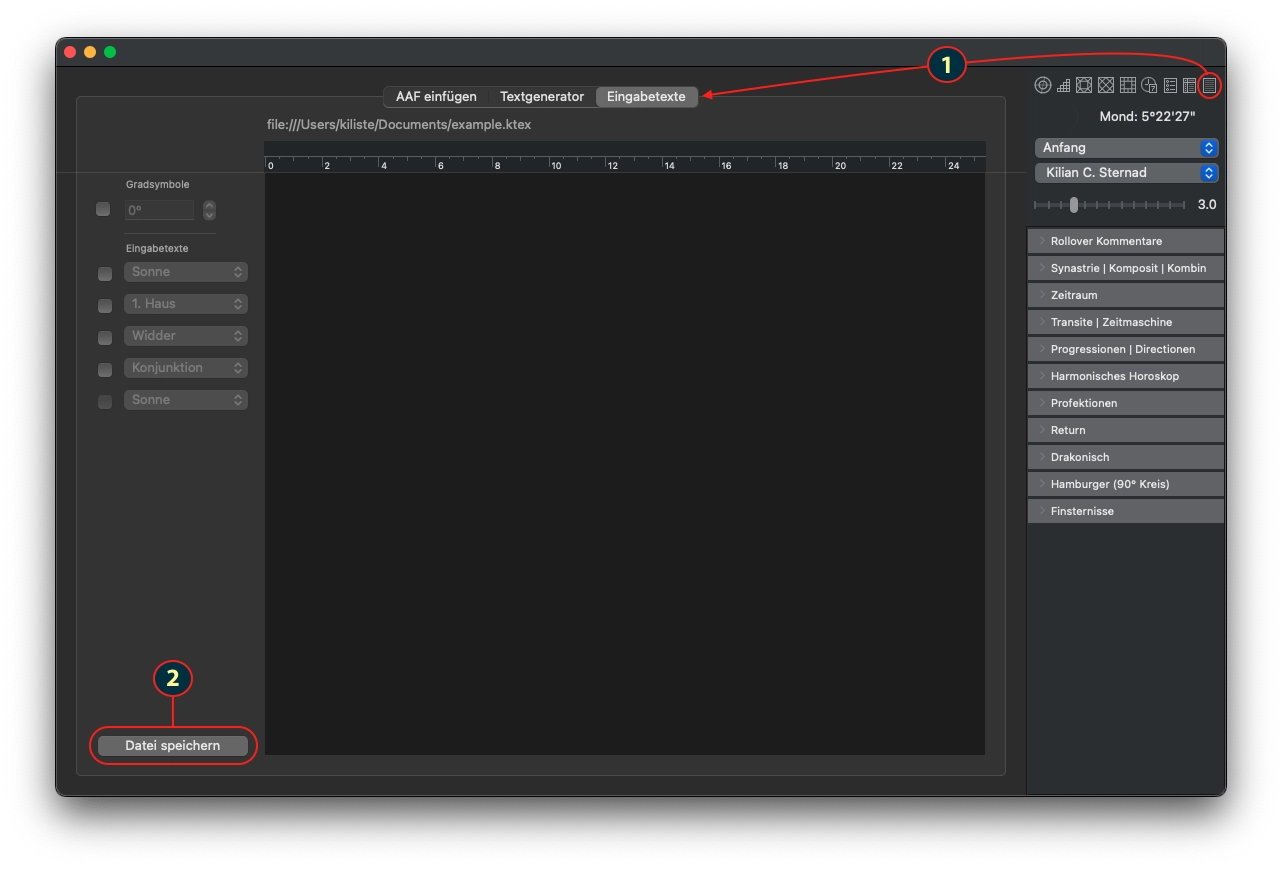
Get started by choosing the texts tab (1) and save a new texts-file (2). Name it according to the topic, so that you can more easily recognise it. => It is also a good idea, to create a special folder for all your interpretations: This does not just let you find them more easily, but also facilitates your backup.

creation of an interpretation texts file

You can write the texts you want, by selecting combinations of the factors the texts are about, like eg “sun in aquarius”, or “venus conjunct pluto”, what ever you can select is also useful.

Just the topic selections, where you select only one item, like “moon” are as of now just for you to collect notes.

Once you have some texts written, you will also want to see them in action:

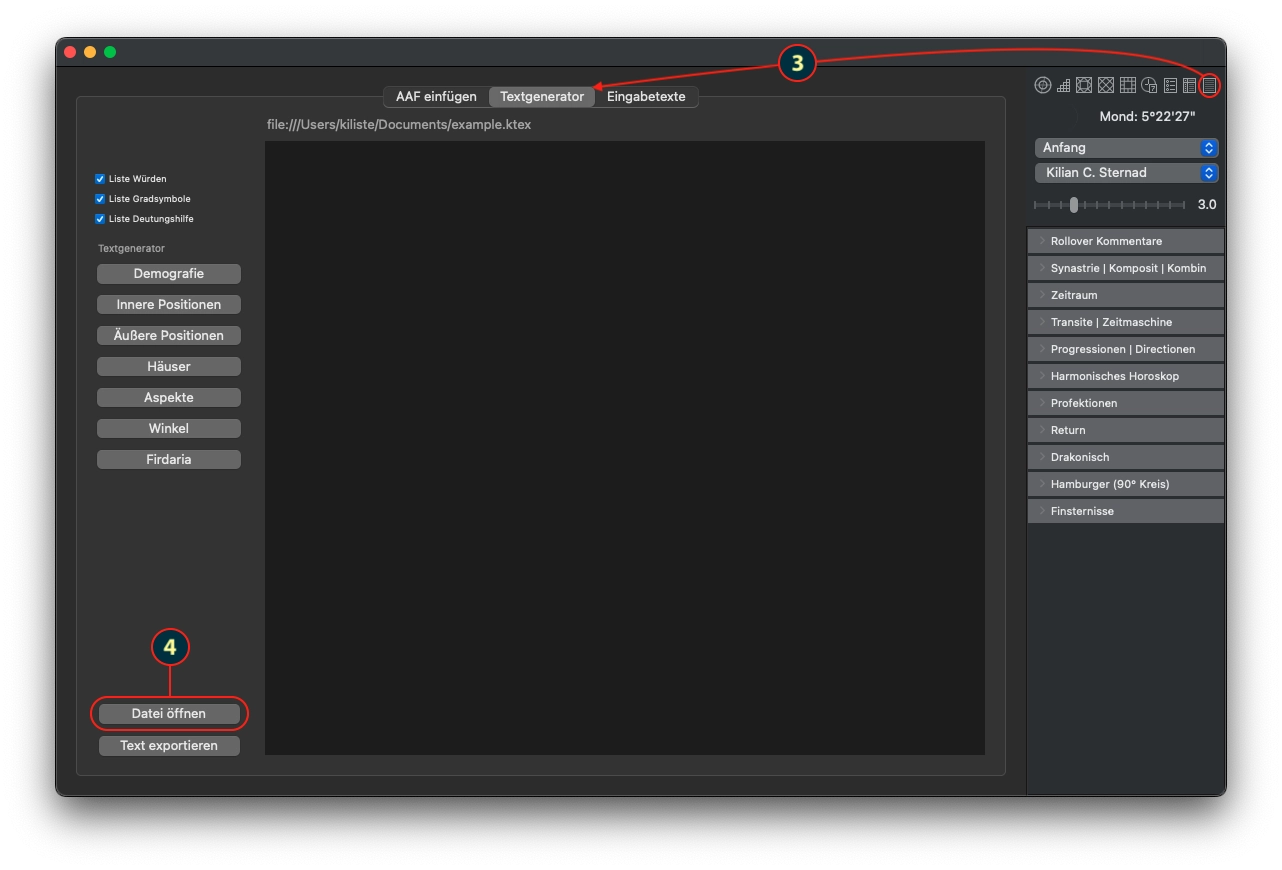
Make your selection like shown in the screenshot below (3) and open the file you just created, or any older one (4). This file will stay the chosen one, until you choose another one. On the path on top of the textbox you can always see, what file is chosen, if there is one.

selection of an interpretation texts file

Then just play with the buttons on the left side and see what will happen.

The idea of the feature is, to make it easy for you, to collect all your infos you have written down to a topic and then work over them in a way, that you get a nice text that can be passed to your client.

Printout

For best printing results, copy paste your created text into the editor of your choice, if necessary change the color and apply some formatting – and, last but not least: Save it from there.

November 16, 2024/0 Comments/by admin
https://kairon.at/Kairon4/wp-content/uploads/2024/06/LogoKairon4_text-2-300x138.png 0 0 admin https://kairon.at/Kairon4/wp-content/uploads/2024/06/LogoKairon4_text-2-300x138.png admin2024-11-16 22:27:472024-11-16 22:27:47Helptexts and Interpretations

Tutorials

  • Videotutorials
  • Data Structure
  • Data Import
  • Backup
  • Kairon 4 from the beginning
  • Basics of data entry
  • First settings
  • Selecting Objects in Kairon 4
  • About those Aspects
  • Colours: The last of the ‘set up’ help files.
  • Back to the Settings Menu
  • Custom Symbols
  • Synastries
  • Asteroids
  • Midpoint-Trees
  • Helptexts and Interpretations
  • AI Interpretation

Company

Mag. Kilian Sternad
Hochstraße 11/14
1230 Wien

Legal

  • GDPR
  • Imprint
  • Contact

Archive

  • February 2026 (1)
  • November 2024 (1)
  • August 2023 (1)
  • April 2020 (1)
  • March 2020 (9)
  • January 2020 (3)
  • December 2019 (1)

Language

  • English
  • Deutsch
© Kairon K.S.
  • Link to Facebook
  • GDPR
  • Imprint
  • Contact
Scroll to top Scroll to top Scroll to top

Diese Seite verwendet Cookies. Mit der Weiternutzung der Seite, stimmst du die Verwendung von Cookies zu.

Einstellungen akzeptierenVerberge nur die BenachrichtigungEinstellungen

Cookie and Privacy Settings


How we use cookies

We may request cookies to be set on your device. We use cookies to let us know when you visit our websites, how you interact with us, to enrich your user experience, and to customize your relationship with our website.

Click on the different category headings to find out more. You can also change some of your preferences. Note that blocking some types of cookies may impact your experience on our websites and the services we are able to offer.

Essential Website Cookies

These cookies are strictly necessary to provide you with services available through our website and to use some of its features.

Because these cookies are strictly necessary to deliver the website, refusing them will have impact how our site functions. You always can block or delete cookies by changing your browser settings and force blocking all cookies on this website. But this will always prompt you to accept/refuse cookies when revisiting our site.

We fully respect if you want to refuse cookies but to avoid asking you again and again kindly allow us to store a cookie for that. You are free to opt out any time or opt in for other cookies to get a better experience. If you refuse cookies we will remove all set cookies in our domain.

We provide you with a list of stored cookies on your computer in our domain so you can check what we stored. Due to security reasons we are not able to show or modify cookies from other domains. You can check these in your browser security settings.

Other external services

We also use different external services like Google Webfonts, Google Maps, and external Video providers. Since these providers may collect personal data like your IP address we allow you to block them here. Please be aware that this might heavily reduce the functionality and appearance of our site. Changes will take effect once you reload the page.

Google Webfont Settings:

Google Map Settings:

Google reCaptcha Settings:

Vimeo and Youtube video embeds:

Einstellungen akzeptierenVerberge nur die Benachrichtigung
